 SummitGPX Help Centre
Public Route Pages
Public route pages give runners a single place to view the latest route, download files and understand the course before race day. They are the easiest way to keep participants on the latest official GPX without resending files.
Each uploaded route gets a hosted page automatically. If the route is private, only authorised account users can access it.
Before sharing a route page widely, follow the Typical Organiser Workflow and use the GPX Health Check workflow to check the GPX runners will download.
What Runners See
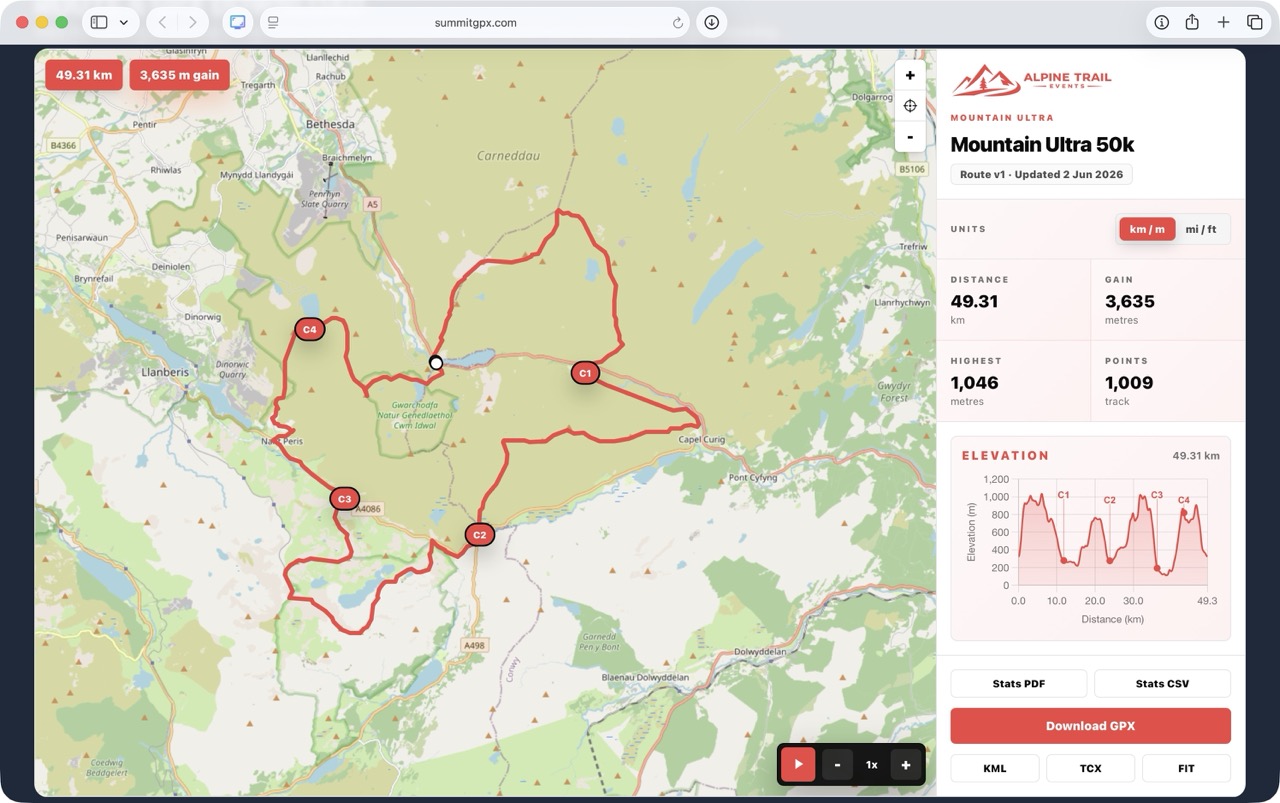
Depending on the route and account features, a public route page can include:
- Interactive route map.
- Distinct start and finish markers. On loop routes, overlapping endpoints are staggered on screen so both remain visible.
- Elevation profile linked to the map.
- Distance, ascent, descent, highest point and lowest point.
- Checkpoints, aid stations, water points, cut offs, summits and crew points.
- Curated checkpoint, facility and warning icons, with short labels where configured.
- Route playback controls on Pro routes.
- Download buttons for supported file formats.
- Version and update information when enabled.
Sharing a Route Page
Share the route page from event websites, runner emails, social posts, QR codes, race packs and event briefings. When the route is updated, the same link continues to show the latest route.
Route pages can be displayed in standard or full size layouts, with route information shown in a sidebar or below the map depending on the selected sharing options.
Distance and Elevation Units
On the organiser route management page, use the Units control beside the route summary to set the route’s default display to km / m or mi / ft. This saved organiser default currently changes distance and elevation together.
To let runners choose their own units, expand Share and embed, switch on Allow runners to choose units, then select Save unit preference setting.
When enabled, the hosted route page and embed show separate controls:
- Distance: km or miles.
- Elevation: metres or feet.
These runner choices are independent, so combinations such as miles with metres or kilometres with feet are supported. The selection updates route statistics, the elevation chart and Distance & Ascent Table downloads. SummitGPX remembers the runner’s choices in that browser where local storage is available.
When runner selection is disabled, runners see the organiser’s saved paired default and the separate unit controls are hidden.
Link Previews and Browser Branding
Hosted route pages and embeds provide social sharing metadata so supported messaging and social apps can show the route title, organisation name and a large preview image. White-label accounts use the uploaded organisation logo where available; otherwise SummitGPX uses its standard sharing image.
A custom Browser Tab Icon can also replace the SummitGPX icon in browser tabs, shortcuts and saved home-screen links.
Downloads
Route pages can provide several download formats:
- GPX: available on all plans.
- KML and TCX: available on Starter, Pro and Enterprise accounts.
- FIT: available on Pro and Enterprise accounts.
- CSV and PDF stats: available when checkpoint data exists, usually on Pro routes where checkpoint management is available.
- Split GPX ZIP: available when organisers have added GPX split points.
The PDF and CSV buttons use the selected distance and elevation units and are available on both the hosted route page and website embed. See Downloads and Exports.
On Pro routes, selected checkpoints can be included as waypoints or course points in GPX, TCX and FIT downloads for compatible GPS devices and watches.
Route Playback
Pro route pages can include playback controls. Runners can play through the route, pause, reset and choose playback speeds such as 0.5x, 1x, 2x and 4x.
Playback is useful for previewing long routes and seeing how the map and elevation profile relate to each other.
Updates and Version Information
When a route changes, SummitGPX updates the public route page, map, elevation profile, statistics and downloads. Existing links, QR codes and embeds continue to work.
Pro accounts can choose whether route version information is shown to runners. This helps runners confirm they are using the latest GPX file.
Private Route Message
Starter, Pro and Enterprise accounts can keep a route private. Where white-label features are available, organisers can add a short private-route message of up to 160 characters. The message appears instead of the route on both the hosted page and embed, for example to tell runners when files will be released.
Analytics
Pro accounts can view route analytics in account settings, including route views, embed views and GPX, KML, TCX and FIT downloads over the last 30 days.
Best Practice
- Share the route page rather than sending GPX files by email.
- Ask runners to revisit the page before race day for the latest version.
- Add update notes for diversions and course changes.
- Review public downloads after route edits, replacements and restores.
- Use private routes for routes that should not be publicly visible yet.
- Use the GPX Health Check workflow if runners are having device import problems.