 SummitGPX Help Centre
Checkpoints
Checkpoints are Pro features for marking important places on a route, such as aid stations, water points, cut offs, cut off times, summits, crew points and other organiser-defined locations.
When added to a route, checkpoints appear on the map, elevation profile, public route page, embeds and supported exports.
For the full setup sequence, including waypoint imports and pre-publish checks, see the Typical Organiser Workflow. The GPX Health Check workflow helps validate the route file, while checkpoint content and placement still need organiser review.
Checkpoint Fields
Each checkpoint includes:
- Name: the full name used in point details and exports.
- Route point type: checkpoint, marshal, aid station, water, food, first aid, cut off, summit, crew point, facilities, information, warnings, hazards and other route-specific types.
- Map marker style: Short label, Icon, or Icon + short label.
- Icon: a curated icon grouped under Checkpoints, Facilities, General or Warnings.
- Short label: a compact map label such as CP1, A1, W2, S or C2/C6. It is uppercase and can contain letters, numbers and forward slashes.
- Location: a place name or human-readable location, such as Howtown, Dale Head or Main Car Park.
- Checkpoint details: practical information for runners, such as food, water, cut off time or crew access notes.
- Show on GPS/watch: includes the point in compatible device downloads.
- Device point type: generic checkpoint, water, food, first aid, summit, danger, left turn or right turn.
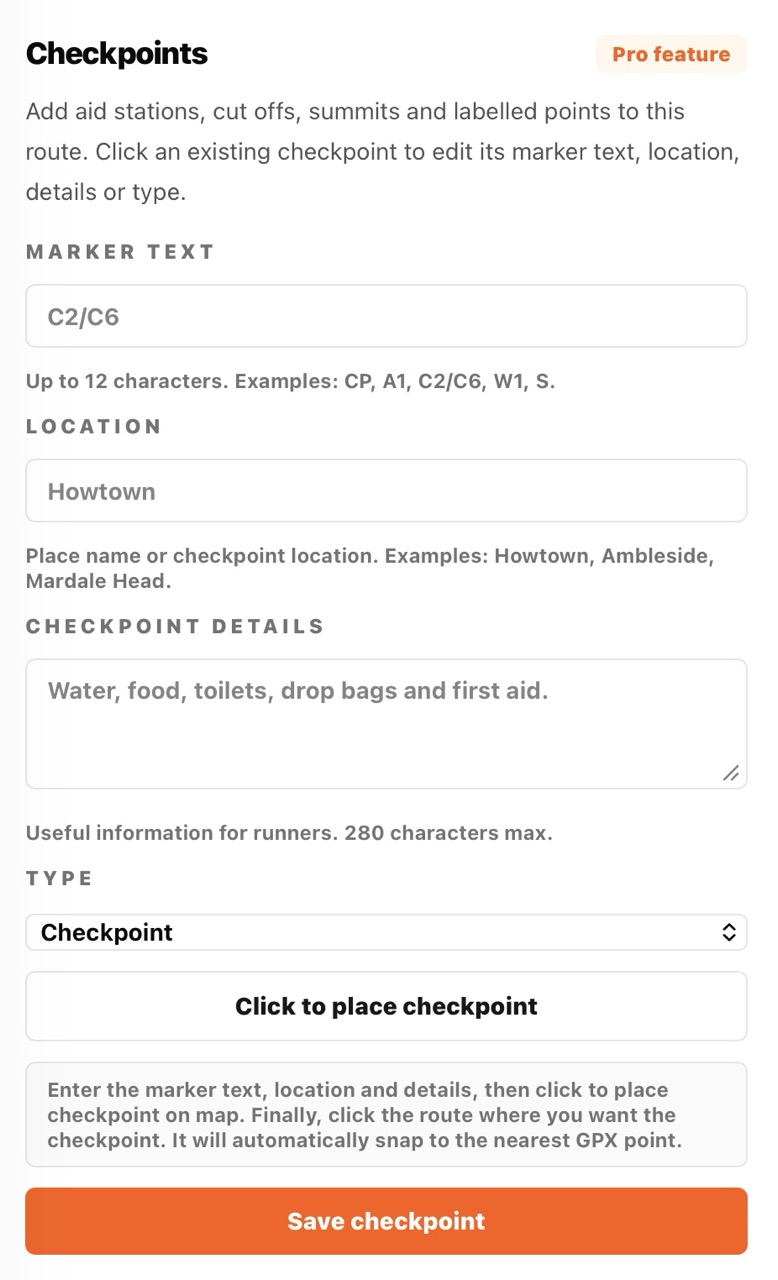
Adding a Checkpoint
- Open the route management page.
- Open the checkpoint tools.
- Choose the type, name, map marker style and icon, then enter any short label, location and details.
- Choose whether the point should appear in GPS/watch downloads and select its device point type.
- Choose the place-on-map action.
- Click near the route line where the checkpoint should sit.
SummitGPX snaps the checkpoint to the nearest point on the GPX route and stores its distance and elevation along the course.
Editing and Deleting Checkpoints
You can edit all checkpoint fields. You can also drag a checkpoint marker along the management map; SummitGPX snaps it back to the nearest route point and updates its route distance and elevation.
Checkpoint changes are reflected on route pages, embeds and exports. You can delete individual checkpoints or remove all checkpoints from a route.
Importing Checkpoints from GPX Files
If an uploaded GPX file contains named waypoints, SummitGPX can import suitable waypoints as checkpoints. This is useful when your planning software already includes aid stations or other course features.
SummitGPX ignores generic navigation waypoints such as unnamed turns, numbered points and routepoint labels. It imports meaningful named waypoints and converts recognised waypoint types into checkpoint types where possible, including water, aid station, cut off, summit and crew point.
To avoid cluttered route pages, large sets of waypoints are not imported automatically. Review imported checkpoints after upload and remove anything runners do not need.
Checkpoints on the Map and Profile
Checkpoints are displayed on the route map and elevation profile, helping runners understand where key locations sit in relation to climbs, descents and distance.
Use a short label for timing-style markers, an icon for facilities and warnings, or both when runners need a visual symbol and a compact reference. Multiple route points at the same location are grouped so the map remains readable.
If a marker contains a split label such as C2/C6, SummitGPX can show the label clearly where the route passes the same checkpoint location more than once.
For section downloads, see GPX Split Points and Replacement Sections.
Downloads and Exports
On Pro routes, the route-level Checkpoint downloads switch controls whether selected points may be exported. Each point's Show on GPS/watch setting then decides whether it becomes a GPX waypoint, TCX course point or FIT course point. Map-only points are excluded from these device formats.
When checkpoints exist, SummitGPX can generate CSV and PDF route statistics that include Start, Finish and checkpoint rows with leg distance, cumulative distance, climb, descent and notes.
For complete format and split-route guidance, see Downloads and Exports.
Best Practice
- Keep marker text short and consistent.
- Use icons for facilities or warnings and labels for checkpoint numbering.
- Only enable Show on GPS/watch for points runners genuinely need during navigation.
- Use the Location field for names runners will recognise.
- Use details for useful race information, not long descriptions.
- Review imported GPX waypoints before publishing.
- Review checkpoint placement after route edits, GPX replacements and version restores.
- After major course changes, re-check the latest GPX and then review checkpoints against the updated route line.